Job 04 · Book the venue's calendar

Fill the calendar. Nothing goes quiet.

Booking the music calendar for a venue is a job of open nights and follow-ups. Cultivate reads your venue against the whole market, flags the nights worth filling, and runs every pitch as a deal: this act, that date, from the first email to the night it plays, on a calendar that tells you how crowded each night already is.

The nights worth filling

Your venue against the whole market.

Before the first pitch, the Venue Console reads your venue the way a buyer would: where it ranks in the city, which nights are open, which acts nearby fit it, and which genres you could own.

  • ✓Open nights, scored. Best nights to book for the genre you want, each with its Night Pressure, and the acts routing through your region on those dates.
  • ✓A Priority Signal every week. Written by your AI Assistant from what changed in your market: a new competitor date, a gap, an act climbing in your genre.
  • ✓The calendar as a project. Start a project for the season, set the rules (mix, nights, budget), and let your AI Assistant propose acts for the nights still open. Every proposal is one click to accept.
You leave with

The open nights you mean to fill, and the acts to pitch for each.
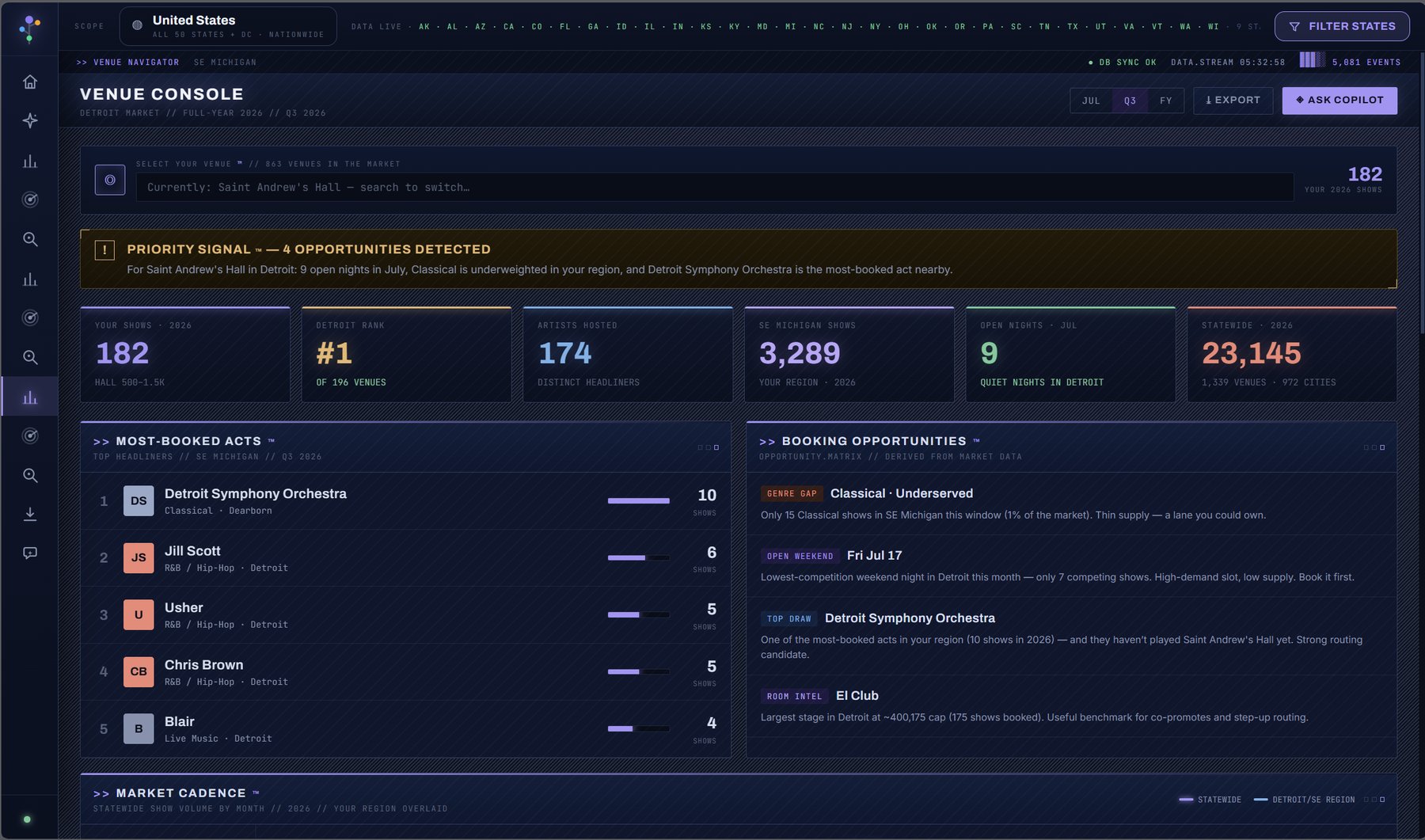
venue-console / your venue against the market
Venue Console: rank in the city, open nights, the most-booked acts nearby and the week's Priority Signal

The deal board

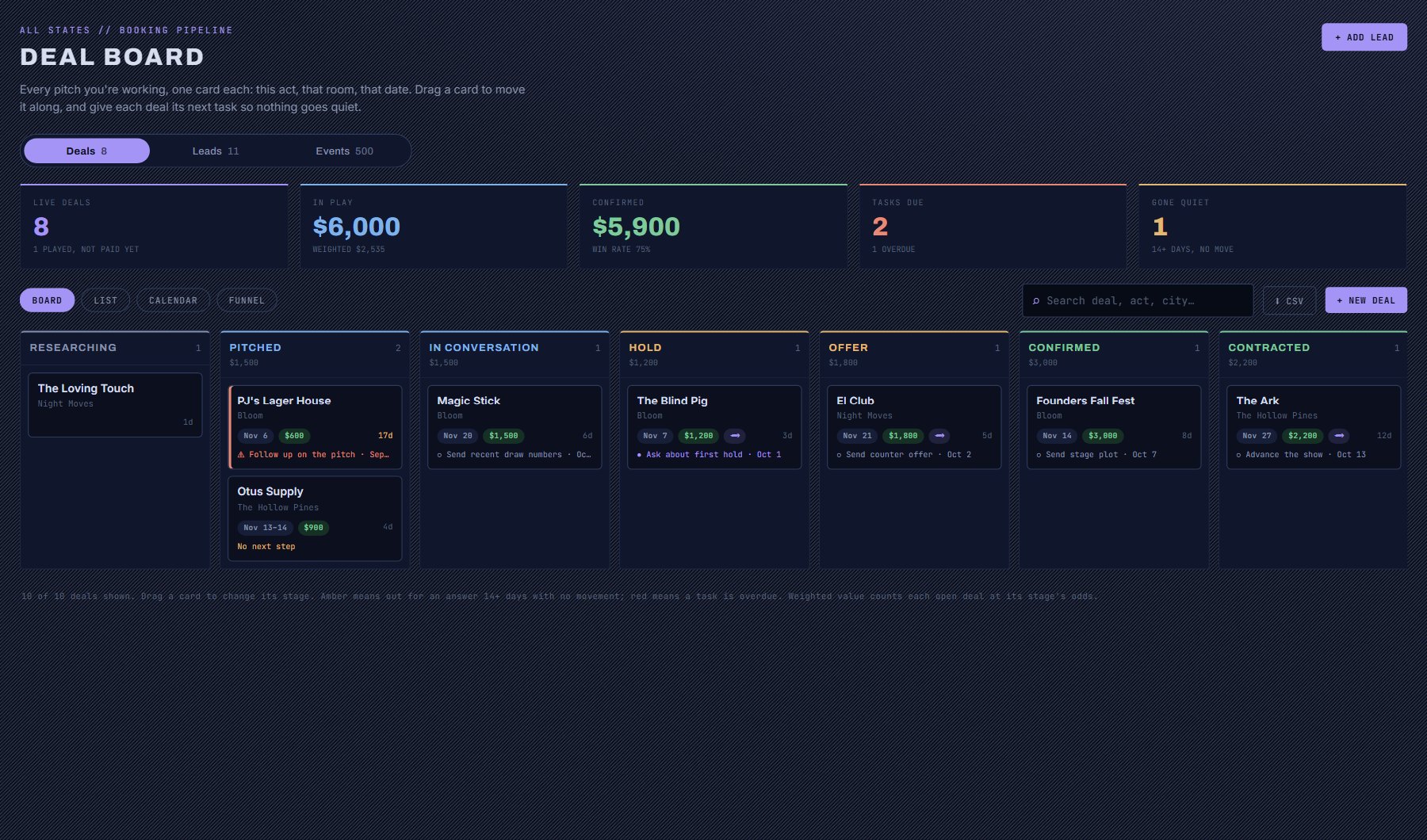
One card per pitch. Drag it as it moves.

A lead is someone you could pitch. A deal is one actual pitch. The same venue can carry a deal for every date and every act you are working, each moving on its own.

  • ✓A booker's stages. Researching, Pitched, In conversation, Hold, Offer, Confirmed, Contracted, Played. Every move is dated and kept, and a played show stays flagged until you mark it paid.
  • ✓The next step is on the card. Each deal shows its next task and when it is due. A deal waiting on an answer with nothing scheduled says so.
  • ✓It tells you what went quiet. Fourteen days with no reply turns a card amber. An overdue task turns it red.
  • ✓The money, weighted. Value in play, value confirmed and your win rate, with each open deal counted at its odds.
You leave with

A pipeline you can read in ten seconds, and the three things to do today.

booking-leads / deals / board
Deal board with columns for Researching, Pitched, In conversation, Hold, Offer, Confirmed and Contracted, each card showing the act, date, amount and next task

Inside a deal

The terms, the tasks and the whole history.

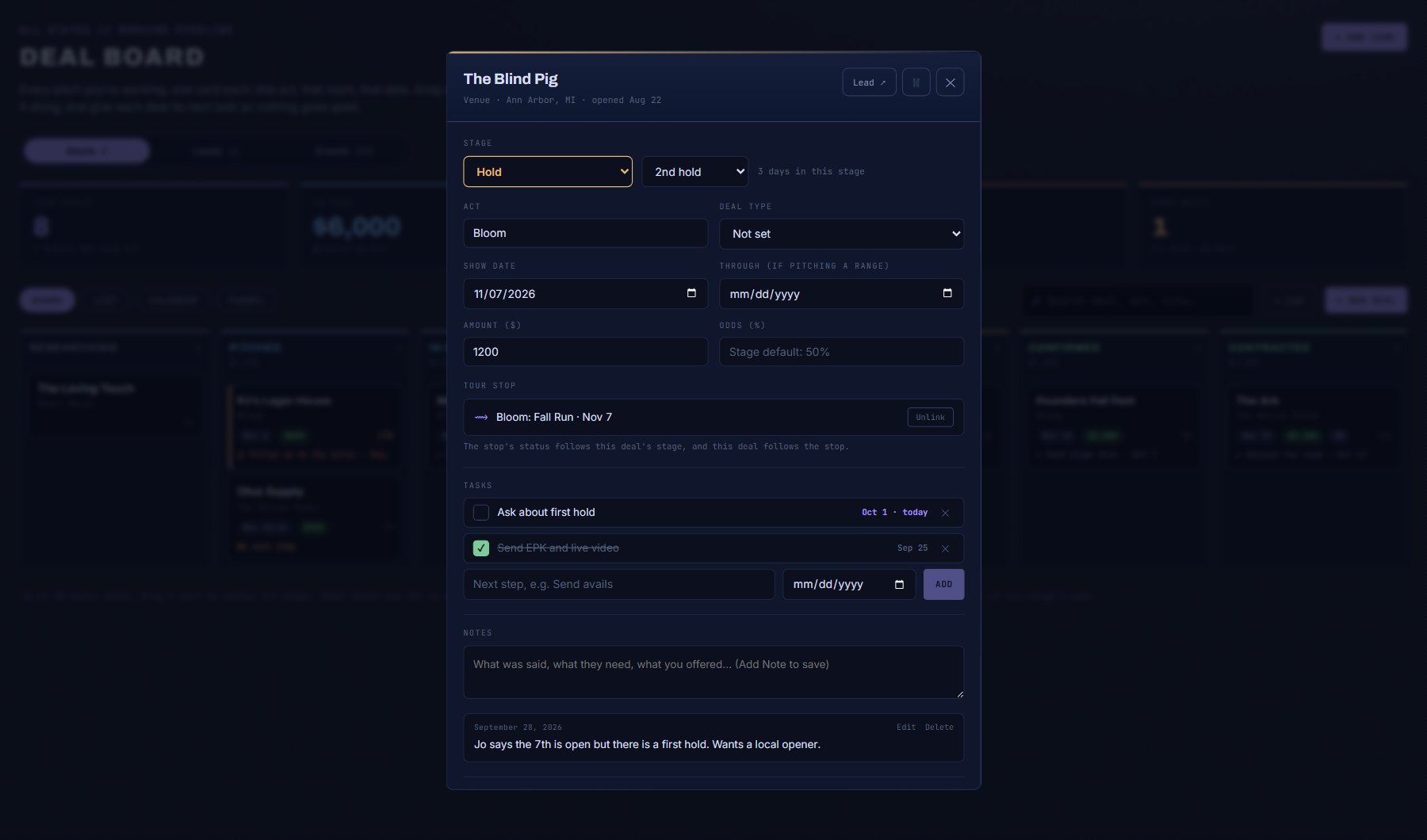
  • ✓Booking terms, not sales fields. Act, show date or a range of dates, deal type, guarantee, your hold position and your own odds.
  • ✓Tasks with due dates. As many as the deal needs. Due ones land on your Dashboard and in the weekly digest.
  • ✓Dated notes. What was said and what you offered, kept on the pitch it belongs to.
  • ✓Why it was lost. Close a deal with a reason and the pattern shows up in your funnel.
deal / the blind pig / hold
A deal at Hold with second hold position, show date, amount, its tour stop, two tasks and a dated note

Calendar · Night Pressure

Your holds on a calendar that knows the competition.

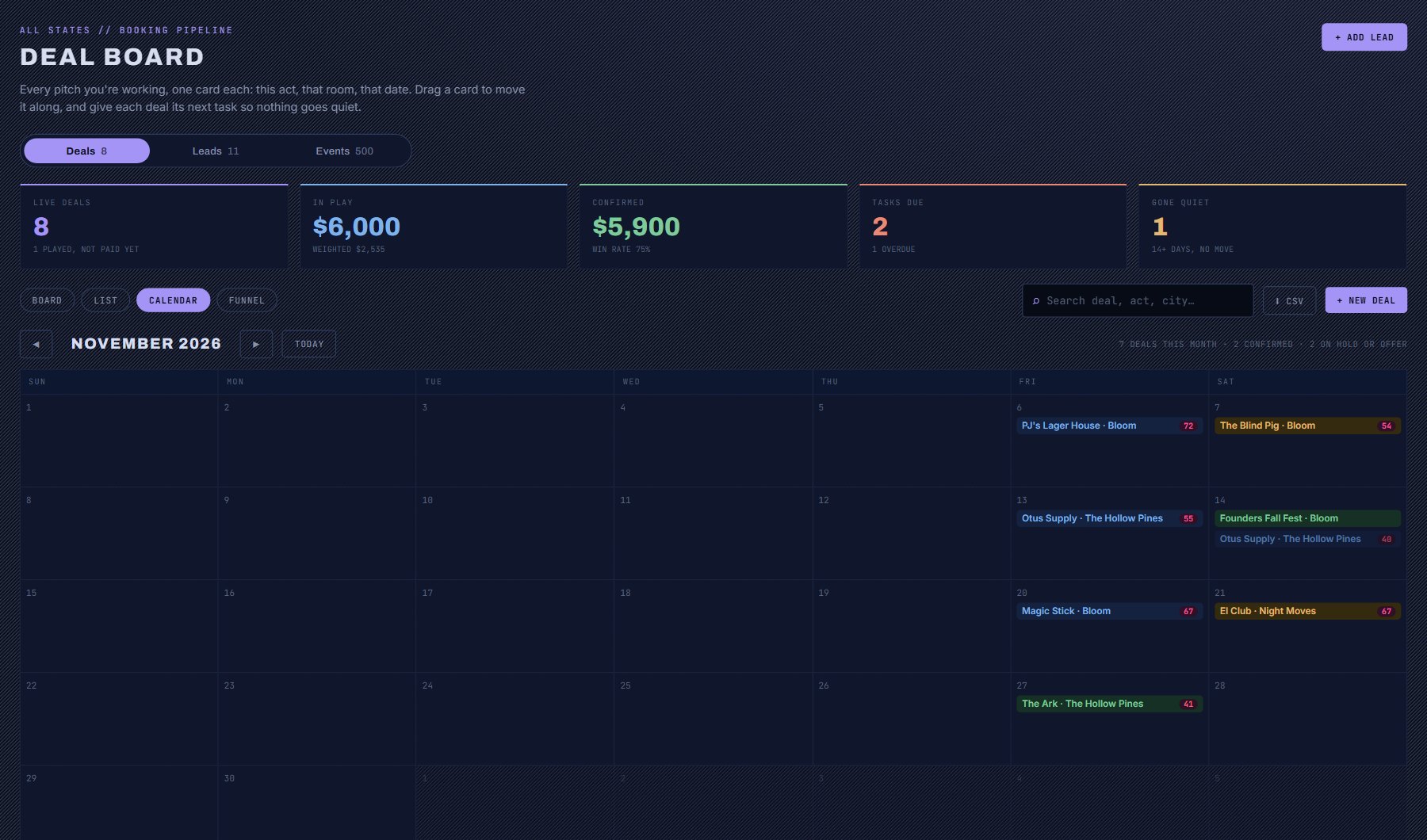
Every hold, offer and confirmed date by month. The number on each one is that night's Night Pressure in its market, the same 0 to 100 score as the Competition Grid, so you can see which of your dates is walking into a crowded night before you confirm it.

booking-leads / deals / calendar
A month of deals on a calendar, each coloured by stage and carrying that night's Night Pressure score

Deals and tours

Work from the board or the tour. The other one keeps up.

A deal with a venue sits on a stop of your tour, and the two follow each other. No retyping a confirmation in two places.

01Board to tour

Confirm the deal, the stop confirms

Move a deal to Hold, Offer or Confirmed and its tour stop takes the same status. The guarantee fills in on the stop.

02Tour to board

Put a stop on hold, the deal moves

Change a stop's status or date in the Tour Planner and its deal follows. A stop with no deal opens one.

03Found by date

Deals find their own stop

A deal that reaches Hold looks for a stop on its date, at that venue or an open date in that city, and puts itself there.

The funnel report

See where your deals actually fall over.

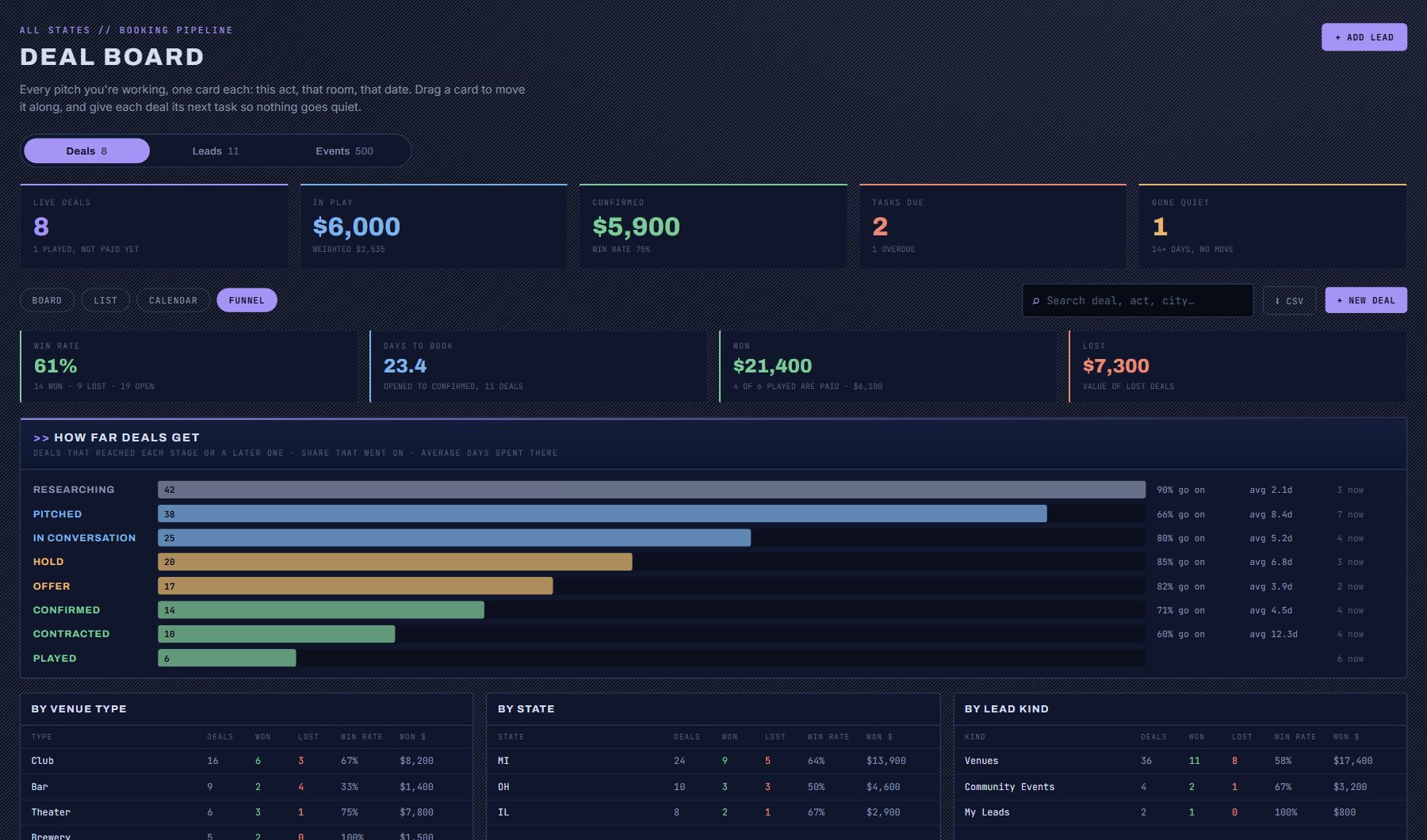
  • ✓How far deals get. The number that reached each stage, and the share that went on to the next.
  • ✓How long they sit. Average days in every stage, and days from first pitch to a confirmed date.
  • ✓Where you win. Win rate by venue type, by state and by kind of lead.
  • ✓Why you lose. Your own reasons, counted.
booking-leads / deals / funnel
Funnel report: win rate, days to book, a bar per stage with conversion, and win rate by venue type and state

Also in the box

Built on the data, not bolted on.

Leads that fill themselves

Star it, it is a lead

Every venue or act you save anywhere in Cultivate is a lead, with its researched booking contacts already attached. Add your own for anything we do not have yet.

Gigs off the listings

Community events that hire music

Fairs, festivals and brewery parties that never appear on a music calendar, with who runs them. Start a deal from any of them.

Your AI Assistant inside

Draft the pitch, ask the pipeline

An outreach email written from the venue's own details and your notes. Or just ask: "what has gone quiet?", "move the Fillmore deal to Offer".

Bulk actions

Move twenty deals at once

Tick the rows, pick a stage or add a task to all of them. Each deal still gets its own history.

Nudges

It reminds you

Due tasks and quiet deals show on your Dashboard and arrive in the weekly digest under "your pipeline needs you".

Yours to take

CSV whenever you want it

Export the deals on screen with stages, dates, amounts, odds and next tasks.

Questions

Common questions.

How is this different from a general CRM?

It is built around how a show gets booked. The stages are a booker's stages: pitched, hold, offer, confirmed, contracted. A deal carries an act, a show date, a hold position and a guarantee, and it sits on the same data as the venue's contacts, its calendar and your tour.

Can I pitch the same venue more than once?

Yes. A deal is one pitch, so the same venue can carry a deal for every date and every act you are working, each at its own stage.

Does it work with the Tour Planner?

Yes, in both directions. Confirm a deal and its tour stop goes to Confirmed. Put a stop on hold and the deal moves to Hold. A deal that reaches Hold finds its stop by date on its own.

Does Cultivate send emails for me?

No. Your AI Assistant drafts the outreach from the venue's own details and your notes, and you send it from your own mail.

Which plans include the CRM?

Every plan. AI-drafted outreach and Ask the Data draw on the AI credits included in the plan.

The complete CRM guide, step by step →

Stop tracking holds in a spreadsheet.

A 20-minute walkthrough on your venues, your acts and your dates.