
Job 03 · Plan and run the tour

Route the tour. Book the venues. Advance every night.

The Tour Planner turns the venues you booked into a routed, dated, advanced tour. Real drive times, market intel on every stop, an AI architect you can type to or talk to, and everything after the handshake: budget, crew, day sheets and a Tour Book.

app.cultivatelmi.com / tour-planner
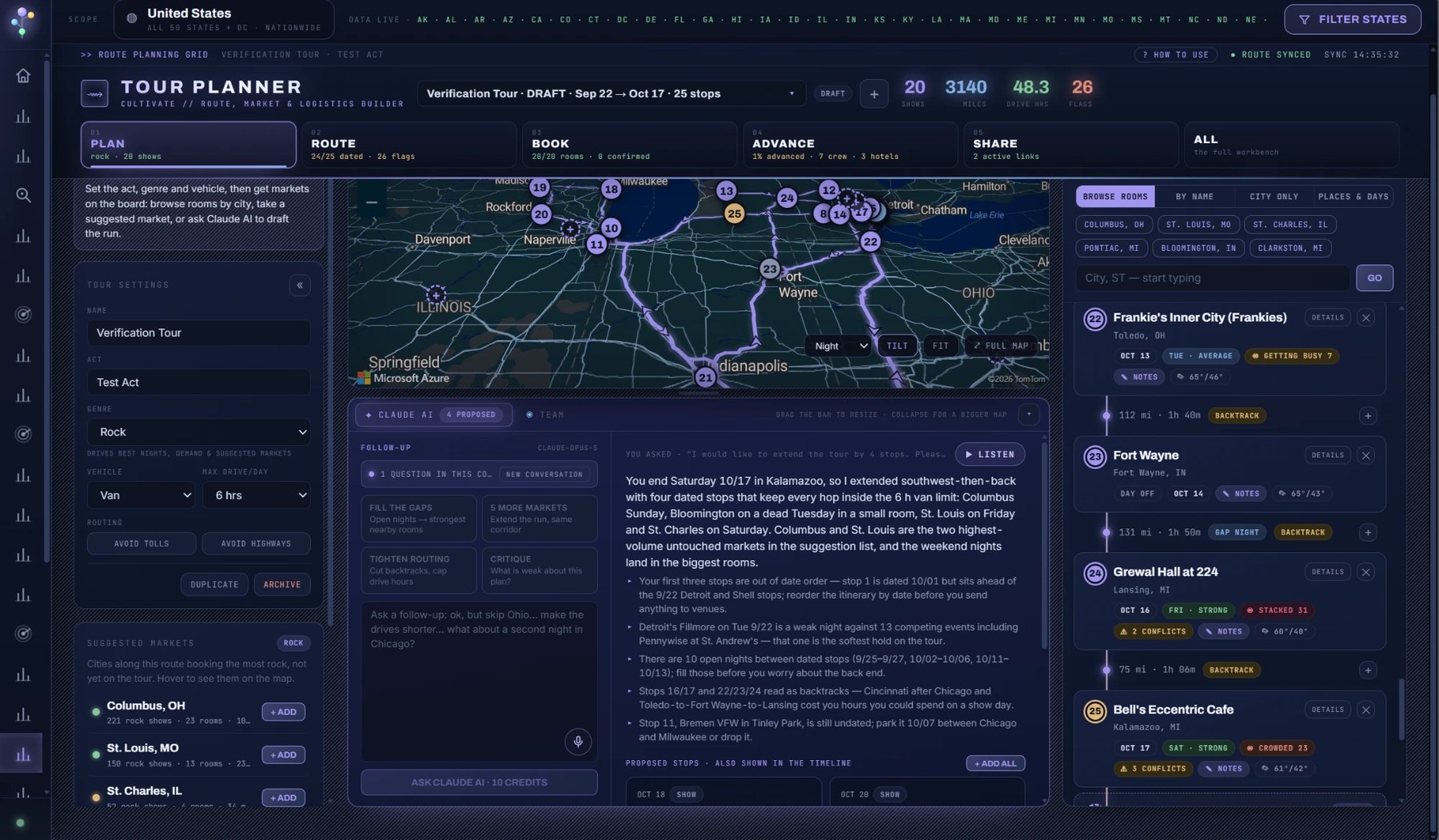
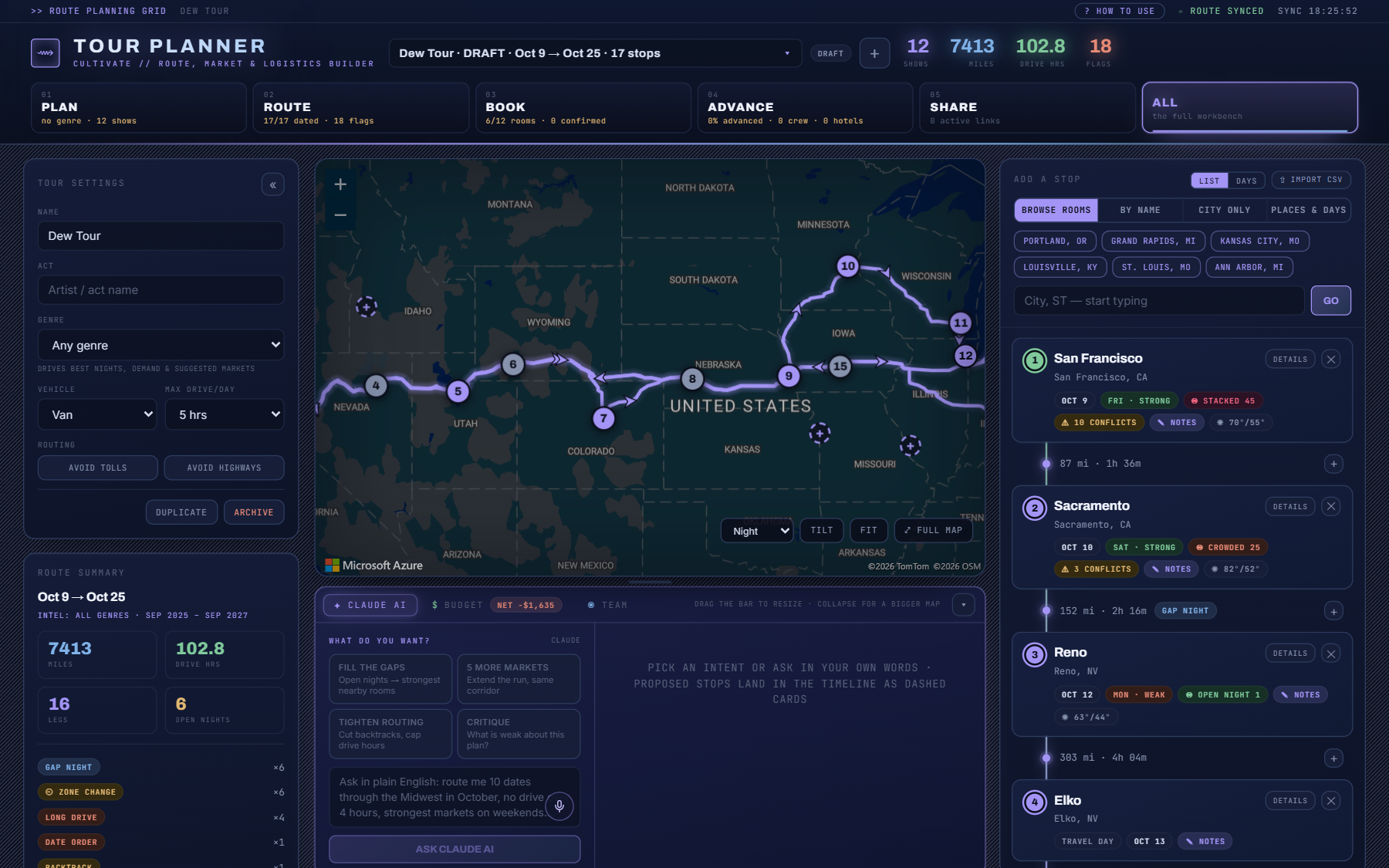
Tour Planner: a 25-stop Midwest run on the map, the stop itinerary on the right, and your AI Assistant proposing four more dated stops
Your AI Assistant

Describe the tour. Or just say it.

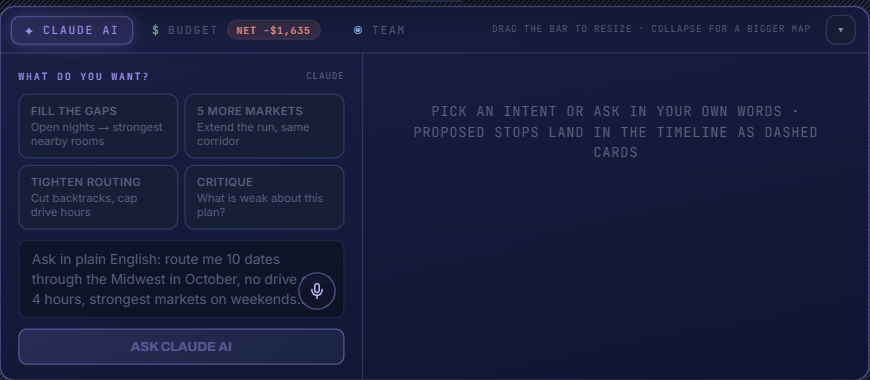
The architect sits under the map and reads the same brief you do: every stop, drive and flag, the market read for each city, the strongest venues nearby, the budget. Ask in plain English, or tap the mic and talk.

  • ✓Grow a tour from a couple of cities. "Extend this by four stops through the Southeast, weekends in the biggest venues." It proposes dated stops with real venues from the markets along your corridor.
  • ✓Fix what is there. Fill the open nights, add five markets along the corridor, tighten the routing, cap the drives, move a soft night.
  • ✓Critique the plan. Which nights are weak against the competition, which legs backtrack, what is still undated before you send anything to venues.
  • ✓Apply with one click, undo with one click. Proposed stops, a proposed order and date changes each land as something you accept, never a silent edit.
  • ✓Voice both ways. Speak the ask through Azure Speech. Have the answer, or a whole day sheet, read aloud while you drive.
Your AI AssistantTour Planner · ask in your own words

    + Add allEvery proposal is one click to apply · undo any of it
    Fill the gaps5 more marketsTighten routingCritiqueBook / advanceBudget

    Five stages, one workbench

    Plan. Route. Book. Advance. Share.

    Under the tour title, a stage bar says how far along the tour is: green when done, amber when not. Pick a stage and the workbench shows only that stage's tools, with the stops that still need work flagged.

    The stage bar: Plan, Route, Book, Advance, Share, and All
    01PlanAct, genre, vehicle, max drive per day. The genre drives every market read on the page.
    02RouteStops in order, real drive legs, flags, suggested markets between cities, the optimizer.
    03BookVenues ranked by genre in every city, lead stage on every stop, availability emails.
    04AdvanceThe checklist as state, the advance email, day sheets, crew travel, hotels.
    05ShareTour Book links per audience, calendar feeds, team access with roles.
    AIArchitectDescribe the tour in a sentence and your AI Assistant proposes stops, an order and dates.

    Screen by screen

    From an empty map to a tour book.

    01 · Start

    Three ways in

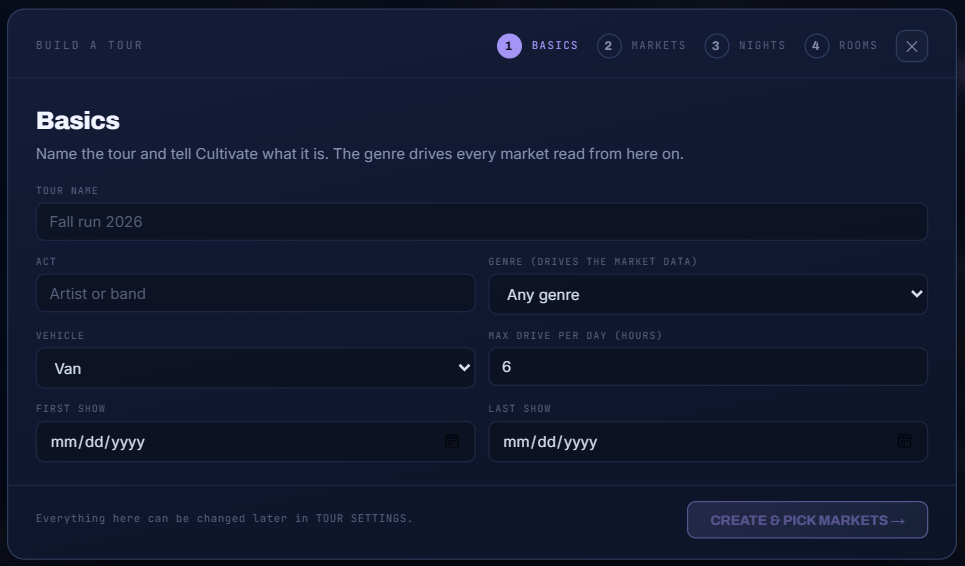
    Name a tour and add stops one at a time. Or take the guided path: four screens that end in a routed, dated, roomed tour. Or describe the tour in a sentence and let your AI Assistant draft it. CSV import pastes a whole routing at once.

    02 · Route

    The real drive, with flags

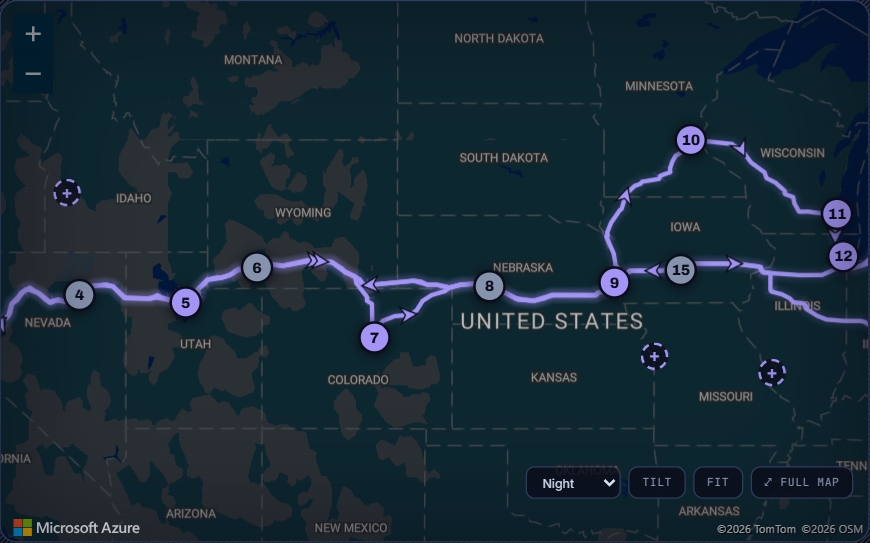
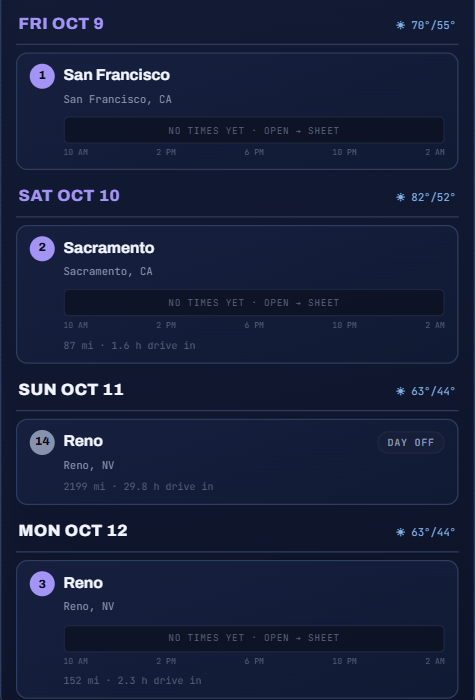
    Numbered pins in order, the actual road between them with direction arrows, and ghost pins for the strongest markets for your genre between two cities. Click a leg to insert a stop. Every leg shows miles and time plus LONG DRIVE, BACKTRACK, GAP NIGHT, SAME DAY or TIME ZONE CHANGE.

    03 · Stops

    One card per stop

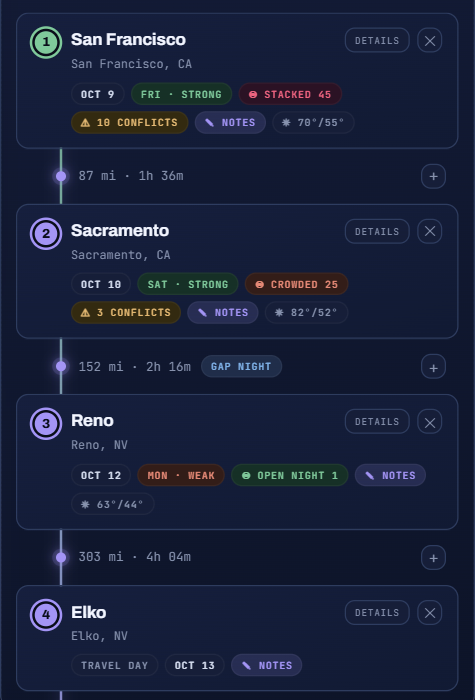
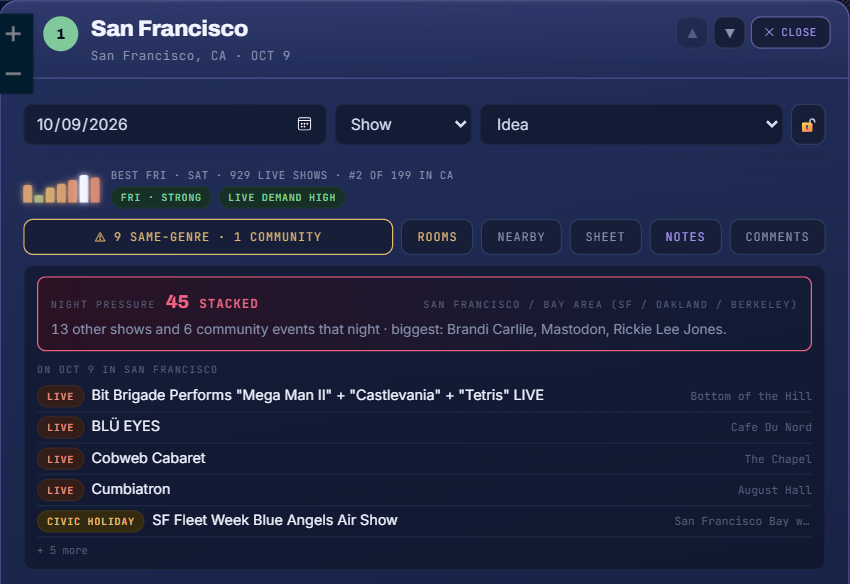
    Date, weeknight strength for your genre, lead stage, conflicts and weather on every card. Drag to reorder. Add a venue by name, browse a city's venues ranked by how much of your genre they book, hold a city before you have a venue, or drop in hotels, day offs and travel days.

    04 · Book

    Open a stop, book the venue

    Night Pressure for the date, same-night conflicts, venues ranked for your genre with local openers, hotels and fuel nearby. Save a venue to Booking Leads, or ASK and Cultivate drafts the availability email and marks the venue contacted.

    05 · Days

    The tour as a calendar

    Every show gets a clock with load-in, soundcheck, doors, set and curfew on it, the drive in, and the weather. Two shows on one night and undated stops stand out.

    06 · Architect

    Ask in plain English

    Fill the gaps. Five more markets. Tighten the routing. Critique the plan. Your AI Assistant reads the same brief you see, stops, drives, flags, market reads and budget, and answers with proposals you can apply one by one or all at once, with undo.

    07 · Money

    The budget projects itself

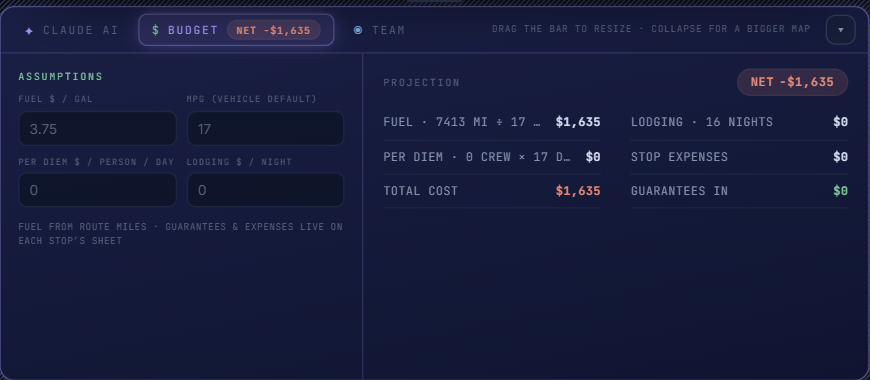
    Fuel from route miles, lodging from hotel stops or nights, per diem from crew and days, plus whatever you enter on each stop's sheet, and the NET against guarantees.

    08 · Crew

    Day sheets on every phone

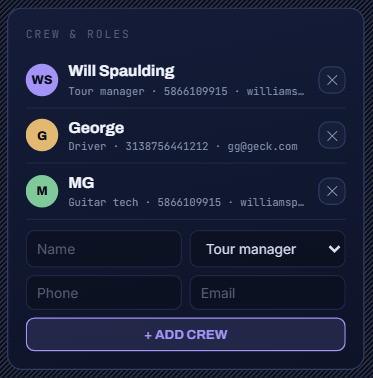
    Add the people on the road with an email each. Every stop becomes a phone page: times big, tap-to-call contacts, wifi with a copy button, the running order, guest list, lodging and a WHAT CHANGED banner. Flip auto-send and it goes out at 6 PM local the evening before. Crew tap GOT IT and you see who has.

    09 · Share

    A Tour Book per audience

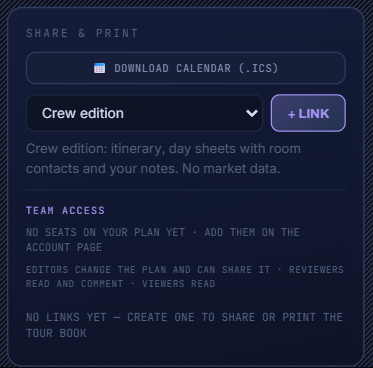
    Crew (contacts and notes), pitch (market brief, no internal flags) and management (everything, budget included). Each link prints cleanly and opens each day as a phone page. Download the calendar, subscribe to the feed, and give teammates editor, reviewer or viewer roles with a discussion thread on every stop.

    Build a tour wizard: Basics, Markets, Nights, Venues The tour map with numbered pins and the real drive The stop itinerary with leg strips and flags A stop drawer with Night Pressure, venues and conflicts Days view with a clock for each show Your AI Assistant panel with proposed stops Budget tab projecting fuel, lodging and per diem Crew and roles panel with auto-send day sheets Share and print panel with Tour Book links

    Everything after the handshake

    The advance, as a checklist you can see.

    Open a stop's sheet and every item the crew needs is MISSING, UNCONFIRMED, CONFIRMED or CHANGED SINCE: load-in, doors, wifi, parking, guest list, merch. Confirm each as the venue confirms it.

    • ✓The advance email writes itself. A branded email to the venue from what you have: what to confirm, what you still need, the running order. Polish it with your AI Assistant, preview it as they will see it, send it from Cultivate Tours with replies to your inbox.
    • ✓Local times, always. Every sheet is local to the stop, and a TIME ZONE CHANGE flag appears on the leg when the clock moves.
    • ✓Weather on every stop. Highs and lows on the card, the sheet and the day sheet.
    • ✓Nearby, from Azure Maps. Hotels, fuel, parking and medical near any stop, addable as stops themselves.
    You leave with

    A Tour Book you can hand to the crew, the agent or management.
    overview
    The full Tour Planner workbench
    Crew and roles
    Share and print

    Everything in the planner

    The whole kit.

    Real routingRoad miles and hours per leg, avoid tolls or highways, max drive per day.
    Suggested marketsTwo cities on the board, and the strongest markets between them appear as chips.
    Venues ranked by genreEvery city's venues ordered by how much of your genre they book, with seasonality and the last three acts.
    Best nights per cityAuto-date the run on the strongest weeknights for the genre, then adjust.
    Night Pressure per stopThe Competition Grid's score, in place, for every dated stop.
    Contacts and crewPick crew and venue contacts from your own contacts; every venue's booking contact one click away.
    Day sheetsPhone pages per stop, sent by hand or automatically at 6 PM local the night before.
    Advance checklist + emailItem-by-item state, a drafted email, AI polish, send from Cultivate Tours.
    BudgetFuel, lodging and per diem projected from the route, NET against guarantees.
    Tour Book share linksCrew, pitch and management editions, print-clean, with phone pages per day.
    Calendar exportAn .ics of every dated stop, and a feed URL to subscribe to.
    TeamEditor, reviewer and viewer roles, a discussion per tour and per stop, an activity feed, live refresh when a teammate edits.
    CSV importDate, venue, city, state, kind, status, notes. Venues match Cultivate's data by name.
    Voice inputTalk to the architect instead of typing. Listen to the day sheet read aloud.
    UndoEvery AI proposal you apply can be taken back.

    Questions

    Common questions.

    Does the Tour Planner use real drive times?

    Yes. Every leg is routed on the road network with miles and hours, flags for long drives, backtracks, gap nights and time-zone changes, and options to avoid tolls or highways.

    Can it suggest venues for each city?

    Yes. Every stop lists the venues in that city ranked by how much of your genre they book, with capacity, recent acts and the booking contact. You can also search every venue within a radius, or add a venue Cultivate does not have yet.

    What is a day sheet?

    A phone page for each stop: load-in, soundcheck, doors, set and curfew, venue contacts, wifi, parking, running order, lodging and weather. Day sheets can go to the crew automatically at 6 PM local the night before.

    Can I share the tour with management or the crew?

    Yes. Every plan opens each day as a phone page for your own use. Professional adds sending day sheets to the crew, plus pitch and management editions of the Tour Book to hand on. You can also export an .ics calendar or subscribe to a feed.

    Route the tour on real data.

    A 20-minute walkthrough on your act, your markets and your next tour.