Guide / My Work
Booking Pipeline
Your booking CRM. The Deals tab is a board with one card per pitch (this act, that venue, that date), each with a stage, the money, tasks and dated notes. The Leads tab is everyone you could pitch: the venues and acts you saved plus leads you add by hand. The Events tab is the feed of community events that hire live music.
WhereMy Work > Booking Pipeline
PlanEvery plan
AI on this screen3 metered actions
Learn it2 tutorials and a complete guide
The booking CRM: complete guideHow to track every pitch from first email to the night it plays: leads, deals, stages, tasks, the board, the calendar, the funnel, and how it all connects to your tours.
14 sections →
Tutorials for this screen
What is on the screen
- The Deals tab with four views: Board (one column per stage), List (one row per deal, with the bulk bar), Calendar (deals by night with Night Pressure on each chip) and Funnel.
- The money tiles: Live deals, In play (weighted by odds), Confirmed with the win rate, Tasks due, Gone quiet.
- A deal: title, stage, act, show date and Through, deal type, amount, odds, hold position and Until, the tour stop, tasks, notes, the brief and the stage history.
- The Leads tab with its chips (All, Venues, Artists, My leads) and + Add Lead; a lead's deals, contact, My Contacts, My Notes, Draft Outreach Email.
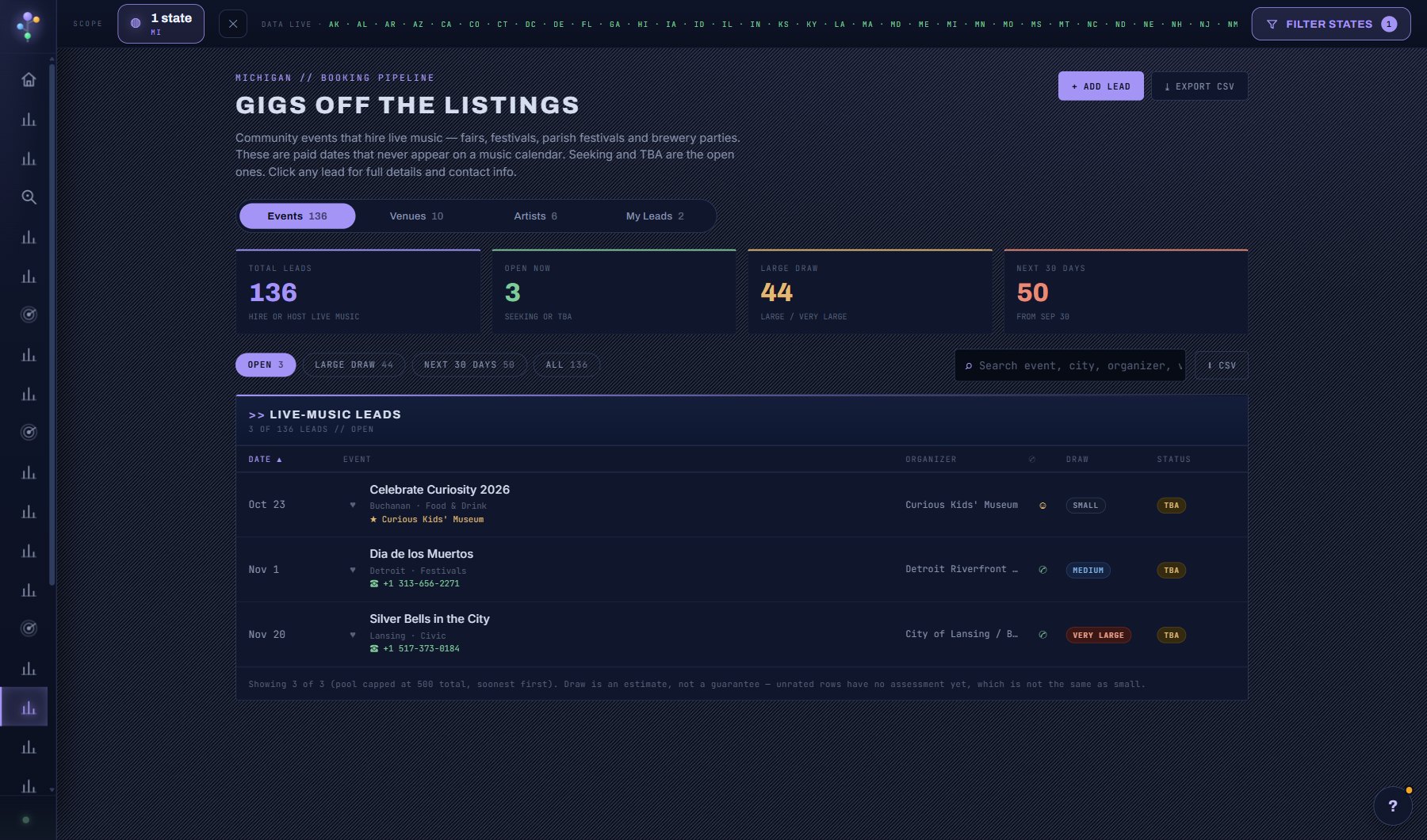
- The Events tab: community events that hire live music, each a lead or a deal in one click.
Try this
- Open a lead and press + New Deal to start a pitch. The same venue can carry several deals, one per date or act.
- Start a deal without coming here: PITCH THIS VENUE on a venue's window, PITCH TO A VENUE on an act's window, the same button on a Fit report and on a night in the Competition Grid. It opens the deal with the venue, act and night already filled in. It does not send anything.
- Pick the act from your acts (on your tours, your deals or saved) or by name and the deal links to the act's record: OPEN ACT on the deal takes you there. A name you only type is kept as text.
- Open a deal and press Write the brief: your AI Assistant reads the deal, the fit between the act and the venue, the night and how long the deal has sat, then says where it stands and suggests the next step. It costs 3 credits, is saved on the deal and is only written again when you press Refresh.
- Cards show the night (how crowded that date is in the venue's market, free) and a FIT chip once you have a Fit report or a brief for that act and venue.
- SHARE on a deal makes a read-only deal sheet you can send: the act, the venue, the night and, if you have them, the Fit and the brief, laid out as a brochure that prints to PDF. Money and your notes stay off unless you tick them, and you can switch a link off at any time.
- Drag a card across the board as the deal moves: Pitched, Hold, Offer, Confirmed, through to Settled. The lead's stage everywhere else follows its deals.
- Give each deal its next task with a due date. Due tasks show on your Dashboard and in the weekly digest, and a deal out for an answer 14 days with no movement turns amber.
- On a hold, set Until: the day the venue releases it. The card reads HOLD UNTIL and the date (red within three days, HOLD LAPSED once past), the Dashboard's Needs attention lists it from a week before, and the weekly digest too. Confirm the date or release it before the venue does.
- A deal with a venue can sit on a tour stop. Linked, they follow each other: confirm the deal and the stop goes to Confirmed, put the stop on Hold and the deal moves to Hold. A deal that reaches Hold finds its stop by date on its own.
- Open the Funnel view on the Deals tab for how far deals get, how long they sit in each stage, your win rate and where deals are lost.
- Draft the outreach email with your AI Assistant from the lead's own numbers, then send it from your own mail.
AI on this screen
Outreach drafts3 CREDITS
Deal briefs3 CREDITS
Act and venue fit2 CREDITS
The cost is on the button before you press it. Reopening a saved report is free, and nothing is charged for an error or an empty answer. See AI credits.
Plan
Every plan. See plans and seats.
Related screens
Where to find it
In the console: My Work > Booking Pipeline. Press ? on any screen for this guide inside the console, or open the screen if you are signed in.