Build a tour with your AI Assistant
Describe the tour in a sentence and let your AI Assistant propose the stops, then accept the ones you want, apply its order and dates, and keep asking. About ten minutes.
What you will do
The Tour Planner's AI Assistant reads your tour (the acts, the genre, the dates, the stops so far), the market around the route and your profile, and answers with a plan: a summary, advice, and proposed stops that land in the timeline as dashed cards you accept or ignore. Each question costs 10 AI credits.
Start with a tour that has a genre and dates (see Create a tour). It can have no stops at all.
1. Ask
- Open the tour in Planning > Tour Planner. The AI ASSISTANT tab sits in the panel under the map.
- Pick one of the six prompts: FILL THE GAPS (open nights between your dated stops), 5 MORE MARKETS (extend the tour along the same corridor), TIGHTEN ROUTING (flag long drives and backtracks), CRITIQUE (what is weak about this plan), PICK VENUES (a venue for every city stop), FILL SHEETS (day sheet times for every dated show).
- Or type your own ask in plain English: "route me ten dates through the Midwest in October, no drive over four hours, venues under 500."
- Press ASK YOUR AI ASSISTANT. The answer takes a few seconds.
2. Read the plan
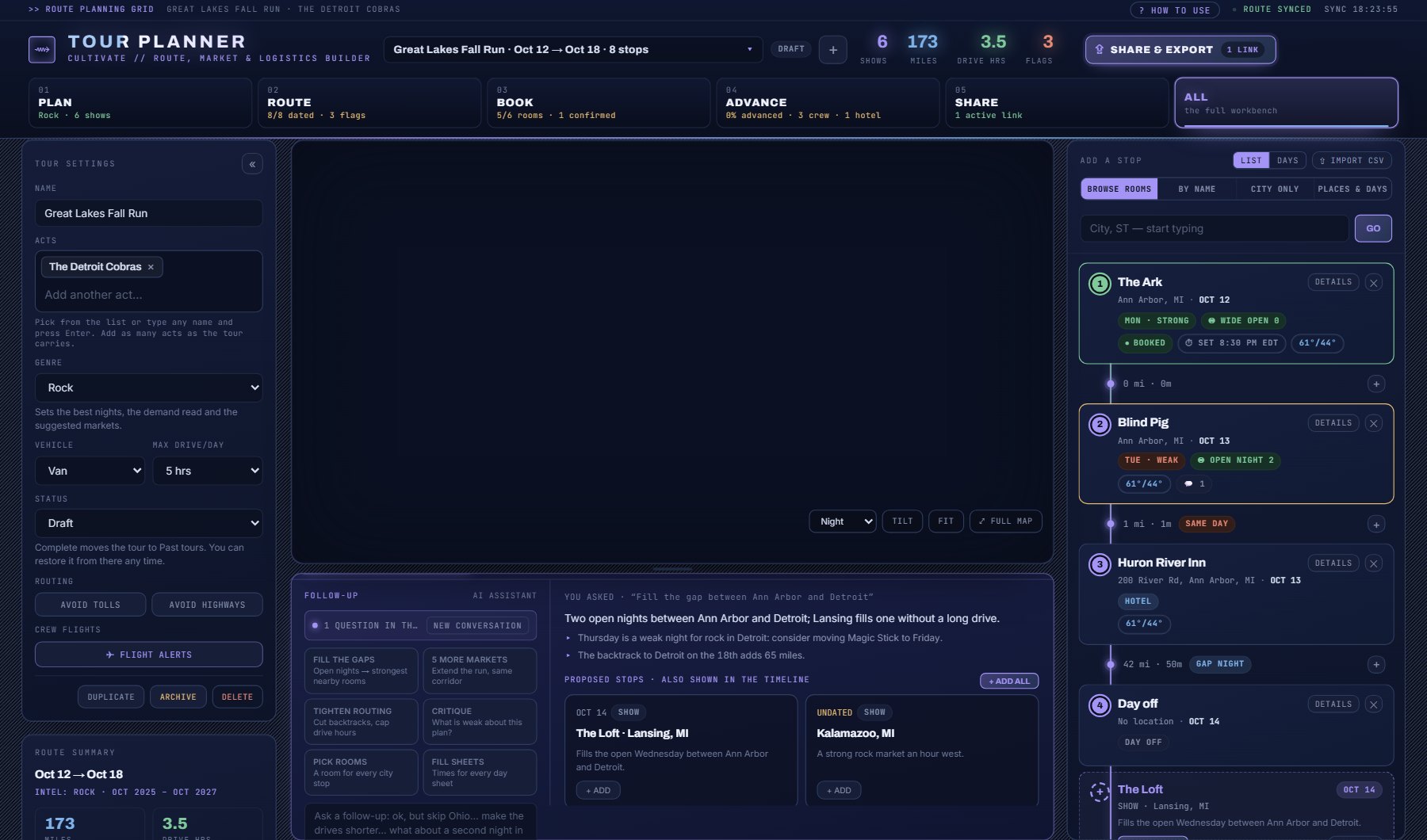
- The panel shows the summary, the advice as bullet points, and the proposed stops: each a real venue from the market data with a city, a night where it could pick one, and a sentence on why.
- The same proposals appear in the itinerary as dashed cards, in the place they would take.
- If it proposes a new order or new dates, APPLY ORDER and APPLY DATES appear beside them.
3. Accept what you want
- Press + ADD on a dashed card to make it a real stop, or + ADD ALL in the panel for every proposal.
- Press APPLY ORDER to reorder your stops as it suggests, and APPLY DATES to take its nights.
- Anything applied can be taken back with UNDO at the bottom of the page.
4. Keep the conversation going
- Ask again and it remembers: "ok, but skip Lansing", "make the Chicago night a Saturday". The panel counts the questions in this conversation.
- NEW CONVERSATION clears the thread and the dashed cards.
Where to go next
Once the stops are real, the wizard's last two screens apply: set the nights and pick venues where the assistant left a city stop. Then Fit on each stop scores the act against the venue.
Fill in Your AI on the Account page first if you have not: the assistant then keeps to your territory, your venue sizes and your kind of act without being told each time.
Where to find it
In the console: Planning > Tour Planner. Press ? on that screen for the short version, or open the screen if you are signed in. The screen's own page: Tour Planner.