Tell your AI Assistant who you are
Fill in Your AI on the Account page: your role, acts, venues, territory, genres, venue size and the voice you want. Every one-sheet, profile, draft and plan is then written for you. About five minutes.
Why it is worth five minutes
Without a profile, your AI Assistant writes for a stranger: a booking profile explains a venue as if you had never booked one, an outreach draft does not know which act you represent, a market entry report does not know you only work the Midwest. With one, every read starts from who you are.
The profile is one paragraph, added quietly to the brief behind every AI feature. It is one profile for the whole account, and only the Owner and Admins change it.
| Where it shows up | What changes |
|---|---|
| Booking profiles and fit reports | Pitched from your side: how to approach the venue as the agent, manager or buyer you are, for the acts you named. |
| Outreach drafts and the Pipeline's draft email | Written in your voice (warm, direct or formal), signed as you, about your acts or your venues. |
| One-sheets and market entry reports | Framed for your territory, genres and venue sizes; the markets and venues it suggests fit what you actually book. |
| Tour Planner's AI Assistant and project plans | Routing and suggestions keep to your states, your drive limits and your kind of venue. |
| Ask the Data and the weekly briefing | Answers assume your role and your market instead of asking. |
1. Fill in the profile
Open Account (bottom of the menu) and the Your AI section at the top.
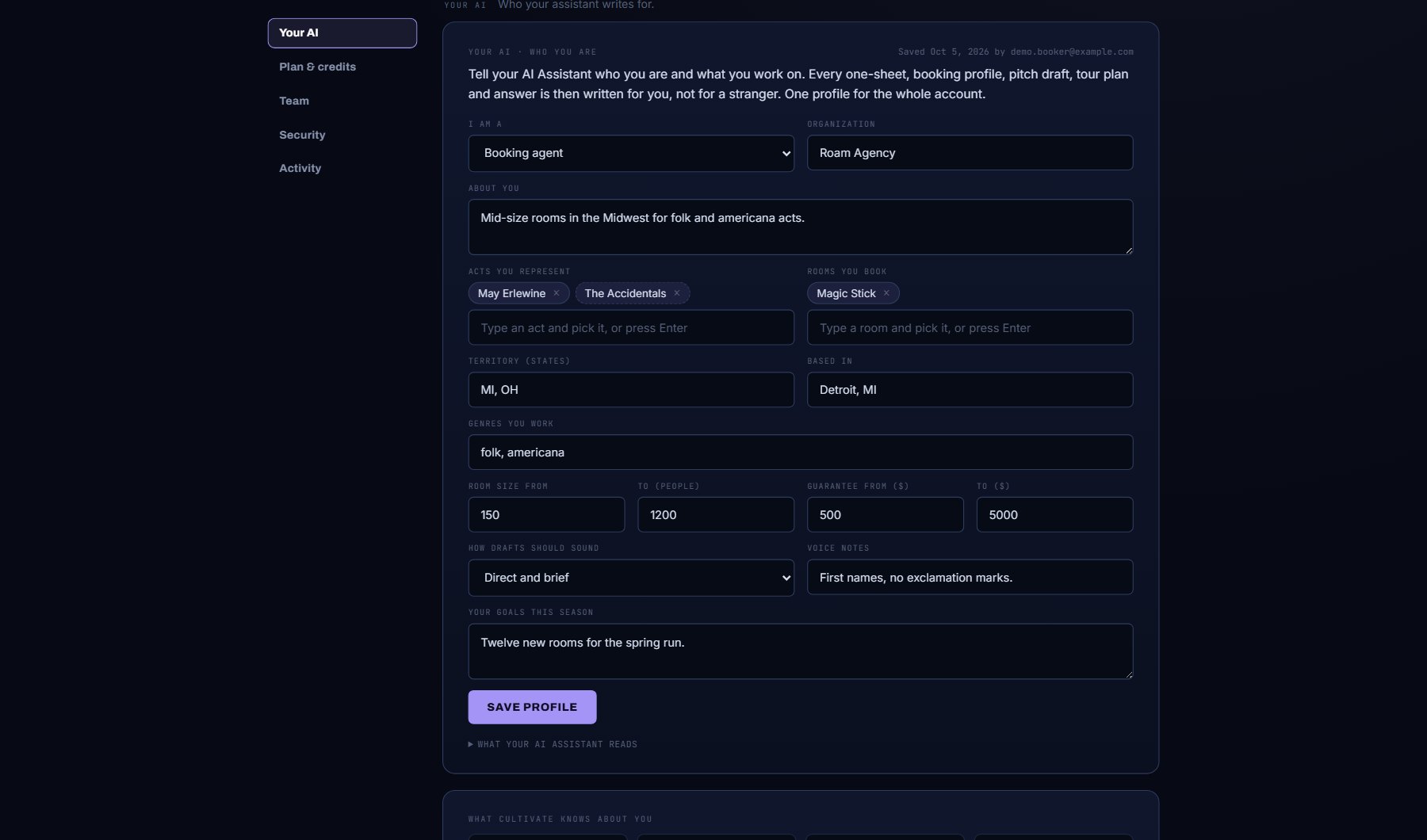
- I am a: booking agent, artist manager, talent buyer (you book venues), promoter, artist or band, or something else. This is the single most useful line.
- Organization, and About you: a sentence or two in your own words.
- Acts you represent: start typing and pick from the list; a name that is not in Cultivate is kept as typed. Venues you book: the same, for buyers.
- Territory (states) and Based in.
- Genres you work, Venue size from / to, and Guarantee from / to: the shape of a deal you would actually do.
- How drafts should sound: warm and personal, direct and brief, or formal and polished. Voice notes for anything else ("never say 'reach out'", "sign as Sam, not Samantha").
- Your goals this season, in a line.
- Press Save profile. "Saved. Your AI Assistant reads this from now on."
2. See what it reads
- Open WHAT YOUR AI ASSISTANT READS under the form. It is the exact paragraph every AI feature now receives, starting "ABOUT THE CUSTOMER". If something reads wrong, fix the field and save again.
- Read WHAT CULTIVATE KNOWS ABOUT YOU beside it: the facts drawn from your own use (saved venues and acts, open deals, where you save venues, AI runs). Those come along too, without typing.
- Press Forget this profile if you ever want it gone. The facts tiles stay, since they are your own records.
Where to go next
Run a booking profile on a venue you know and read it again: it now speaks to you. Then draft an outreach email on a project and check the signature and the tone.
Where to find it
In the console: Account. Press ? on that screen for the short version, or open the screen if you are signed in. The screen's own page: Account.