Guide / Research
Events Dashboard
The event market as an analyst reads it, not a list of shows to go to: shows a week and booked ahead, which nights are crowded, genre supply against the country, how concentrated the volume is, what size of venue carries it, and how much non-music competes for the same nights.
WhereResearch > Music Market > Events tab
PlanEvery plan
AI on this screenNone: everything is computed
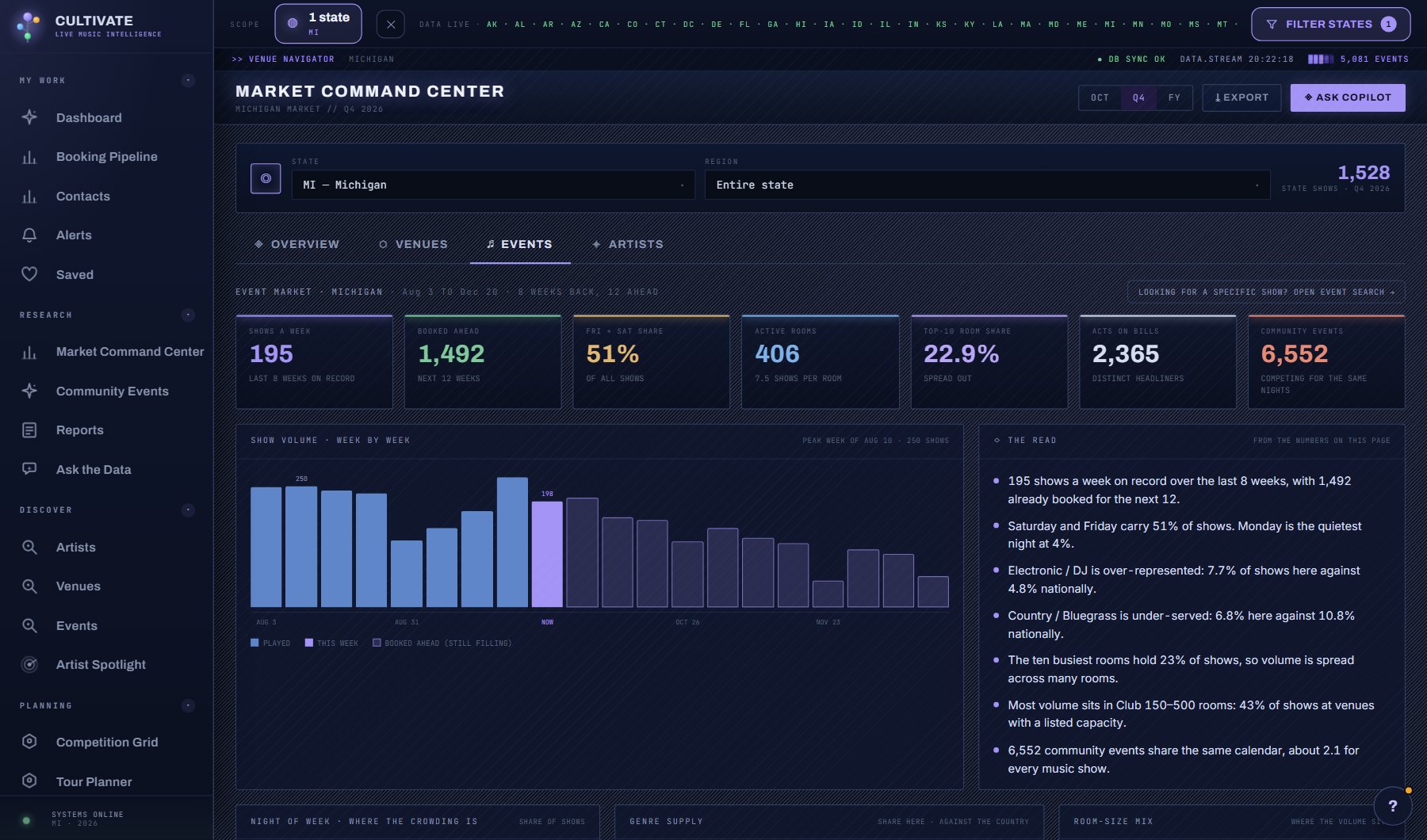
What is on the screen
- The tiles: every live music show on record for the scope, shows a week, booked ahead, the Friday and Saturday share, active venues, the top-10 venue share, acts on bills and community events.
- Show volume as bars, with a WEEK / MONTH switch: 8 weeks back and 12 ahead, or 11 calendar months back and 6 ahead. Solid bars are played, outlined bars are booked ahead and still filling.
- The Read: sentences computed from the page's numbers, including the busiest month in view.
- Which nights of the week carry the volume.
- Genre supply against the national share, marked above or below 1.0x.
- The concentration table: which venues carry the shows, with a running share, and what size of venue they are.
- How much non-music competes for the same nights, from the community calendar.
Try this
- Read the sentences under The Read first. They are computed from the numbers on the page and cost nothing.
- Switch the volume chart to MONTH to see the season: 18 calendar months, with the months ahead outlined because they are still filling. The console remembers the view.
- Look for a genre marked below 1.0x the national share. That is where the venue is, or where demand is not.
- Click a venue in the concentration table to open its profile. The right-hand column is the running share of all shows.
- Click a night, a week or a month, a genre, a venue size or a city to drill into those shows; the drill names the nearest ones.
AI on this screen
No AI on this screen. Everything here is computed from the data and costs nothing.
Plan
Every plan. See plans and seats.
Related screens
Where to find it
In the console: Research > Music Market > Events tab. Press ? on any screen for this guide inside the console, or open the screen if you are signed in.