Guide / Discover
Venue Search
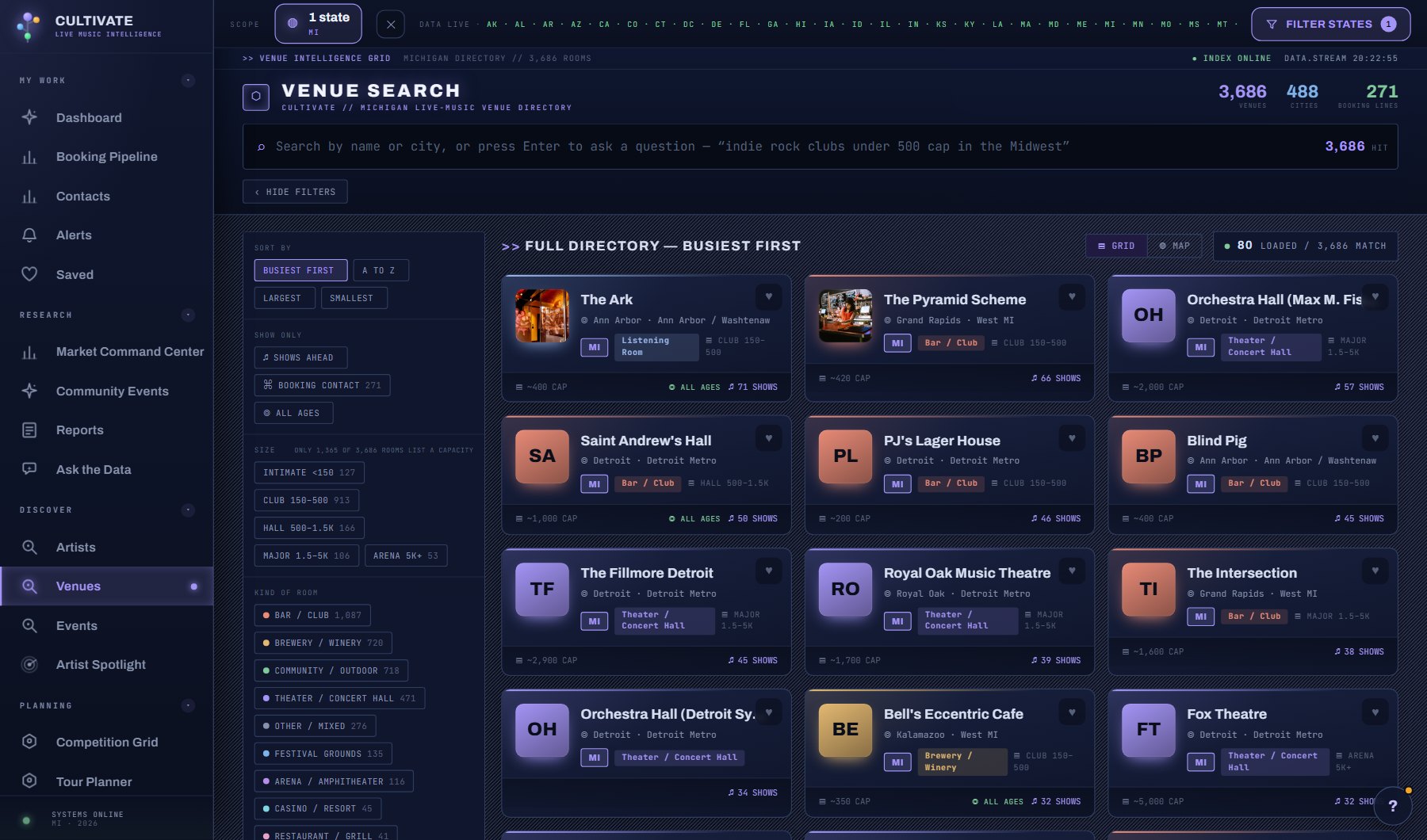
Every venue in the states you filter, with the booking contact when one is on file. Search by name or city, narrow with the filter panel beside the results (size, kind of venue, what it books, region, city, shows ahead, booking contact, all ages), or ask in plain words and let your AI Assistant turn it into the right filters.
WhereDiscover > Venues
PlanEvery plan
AI on this screen2 metered actions
Learn it1 tutorial and a complete guide
The venue windowWhat opens when you click a venue anywhere in the console: the left column that stays put, and the seven tabs (Overview, Analytics, Calendar, Booking, Demographics, Photos, AI), with a picture of each.
8 sections →
What is on the screen
- The search box, which takes a name, a city or a plain sentence that your AI Assistant turns into filters.
- The filter panel beside the results: size, kind of venue, what it books, region, city, shows ahead, booking contact, all ages, and the sort.
- The results, as cards or a list, each with the heart to save it and a dot when a booking contact is on file.
- A venue's window: Overview, Analytics, Calendar, Booking, Demographics, Photos and AI tabs, with + ADD TO PROJECT, PITCH THIS VENUE and ASK ABOUT THIS VENUE at the top.
Try this
- Type a sentence such as 'theaters in Michigan over 900 cap with a booking contact'. The filters fill themselves in.
- Use the panel on the left: pick a size and a genre, tick Shows ahead, then sort by Busiest first to see the working venues that fit your act.
- Open a venue. The six tabs are Overview, Analytics, Calendar, Booking, Demographics and Photos.
- On a venue's AI tab, build the AI booking profile once; reopening it later is free. The Overview shows its first lines.
AI on this screen
Venue booking profiles3 CREDITS
Act and venue fit2 CREDITS
The cost is on the button before you press it. Reopening a saved report is free, and nothing is charged for an error or an empty answer. See AI credits.
Plan
Every plan. See plans and seats.
Related screens
Where to find it
In the console: Discover > Venues. Press ? on any screen for this guide inside the console, or open the screen if you are signed in.